
Sometimes, customers need a company that caters to their neighborhood – and at times, they may need a service as quickly as possible.
For instance, if you lose power or your sink starts to overflow, wouldn’t you want an electrician or plumber as soon as possible?
But where would you begin to look?
Unless you already know one (or someone who knows one), it could be difficult and stressful to find someone to help on short notice.
This is where Google Local Service Ads come in – helping local businesses and customers connect.
What are Google Local Service Ads?

Google Local Service Ads are simply Google ads that local businesses use to promote the products and services they offer.
If a business ranks high on Google’s search engine, there is a better chance it will be seen by potential customers.
Google Local Service Ads aim to raise awareness for potential customers of various businesses in their neighborhood or local area.
In addition to raising awareness, Google Local Service Ads display reviews and other details to help customers decide which business to work with.
According to BrightLocal, the presence of LSAs (Local Service Ads) affects the number of clicks for all other SERP types.
When LSAs are present, an impressive 25.3% of all clicks are on paid results. Comparatively, when LSAs are not present, only 14.6% of clicks are on paid search results.
This is also true in organic results, albeit inversely – 50% of clicks occur on organic results when there are no LSAs, but that drops to 44% when LSAs are present.
So, what drives the high percentage of clicks on LSAs?

According to the study, review ratings play the biggest motivator- something that both organic and paid results typically don’t have.
But this also goes for the business side of things.
Google will position your LSA for a greater click share if a number of positive Google ratings are displayed.
Your potential customer will see details (i.e., reviews, qualifications, service specifications, etc.) before first contact.
Without reviews, Google Local Service Ads will serve a more relevant ad, sparing potential mismatch between business and potential customer.
Where do Google Local Service Ads Appear?
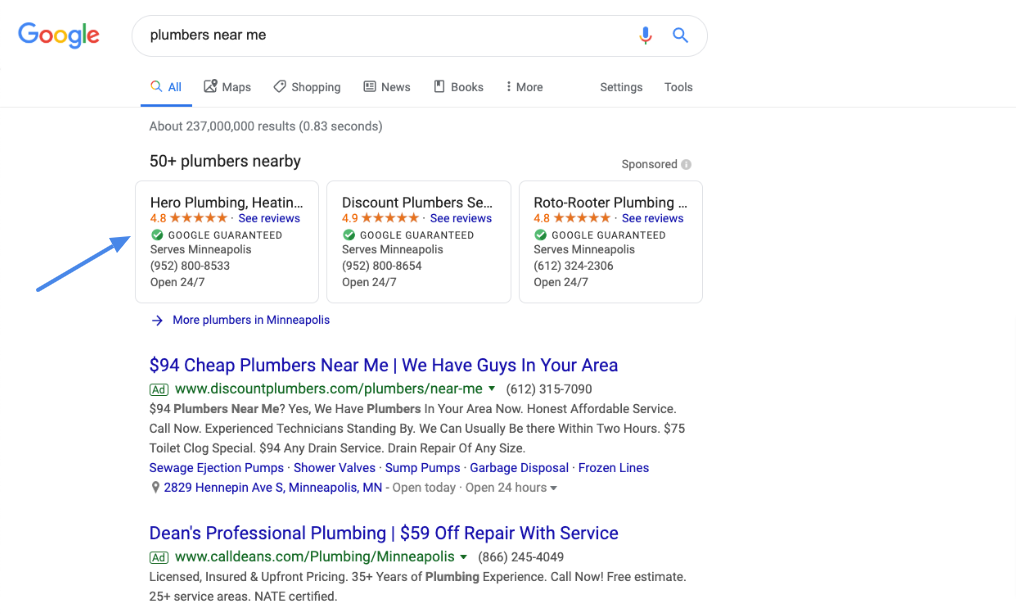
Take a look at the screenshot above.
You can see that Google Local Service Ads appear at the absolute top position on search results page even before organic or paid search results.
For example, if someone searches “[service] nearby/in [name of city/town/area],” then Google will show the top businesses available in that particular area.
How Can I Use Google Local Service Ads for My Business?
Now that you know where Google Local Service Ads appear, the next logical question to ask is how you can use them for your business.
Fortunately, it’s pretty easy – provided that you meet Google’s requirements and guidelines:
1) Sign up with a local services by Google Partner in your area
First of all, you need to sign up with a Local Services by Google partner in your area – and there are many of them.
Just type in “Local Services Ads sign up” on Google, and you should get a list of them. Note that signing up with a partner differs from signing up for the actual Google Local Service Ads.
Once you find a partner in your area, follow their sign-up process.
2) Sign up for an account on the Google My Business platform
After signing up with a partner, the next thing that you need to do is sign up for an account on the Google My Business platform.
Note that this is different from your regular Google account. A Google My Business account is free.
You can use it to manage your business information – such as name, address, phone number, website, etc. – across Google products (including, but not limited to, Search and Maps).
3) Sign up for Local Services Ads
Once you have a Google My Business account, the next step is to sign up for Local Services Ads.
You can do this by going to your Google My Business account and then looking for “Promote with ads” under the “Promote” header. After that, follow the on-screen instructions.
4) Verify your business information and location.
After signing up for Local Services Ads, the next thing that you need to do is verify your business information and location.
This is an important step to ensure that potential customers will be able to find you when they search for businesses in your area.
5) Pass Google’s screening process
The last step is to pass Google’s screening process.
This usually includes a background check and a business or trade license verification – depending on your business type and location.
Once you pass the screening process, you should be good to go!
What Services Are Supported by Google Local Service Ads?
The services that are supported by Google Local Service Ads differ from country to country. But as of this writing, the following services are available:
- VAC
- Garage door services
- Locksmiths & Locks
- Plumb